> ## Documentation Index
> Fetch the complete documentation index at: https://docs.reliantlabs.io/llms.txt
> Use this file to discover all available pages before exploring further.
# Threads
> Understanding conversation structure, sub-agent isolation, and thread modes
Every conversation in Reliant is organized into threads. Threads matter most when working with sub-agents and complex workflows.
## What is a Thread?
A thread is a sequence of messages—user inputs, AI responses, and tool results. When you start a chat, Reliant creates a root thread for your conversation.
When workflows spawn sub-agents or run child workflows, each can get its own thread. This keeps conversations isolated: a research agent's internal dialogue doesn't clutter your main conversation.
## How Threads Work
Threads are managed automatically by the workflow engine. When a workflow or node executes, it receives a thread from its execution context. Activities like `CallLLM` and `SaveMessage` automatically use this thread—you don't need to pass thread IDs explicitly.
Thread behavior is controlled at the **workflow and node level** using `ThreadConfig`. This determines whether a child workflow shares its parent's thread, gets a fresh thread, or forks from the parent's conversation history.
## Thread Modes
Configure thread behavior on workflow or loop nodes using the `thread` field:
```mermaid theme={null}
flowchart LR
subgraph inherit["inherit (default)"]
P1[Parent Thread] --- C1[Child Node]
P1 --- C1b[Messages shared]
end
subgraph new["new"]
P2[Parent Thread] ~~~ C2[Child Thread]
C2 --- C2b["Empty (isolated)"]
end
subgraph fork["fork"]
P3[Parent Thread] -->|copy messages| C3[Child Thread]
C3 --- C3b[Diverges independently]
end
```
**inherit** (default): Use the parent's thread. Messages appear in the same conversation. This is how most single-agent interactions work.
```yaml theme={null}
- id: call_helper
workflow: builtin://agent
thread: inherit # Share parent's thread
```
**new**: Create a fresh, empty thread. The sub-workflow starts with no conversation history. Useful for spawned agents that should work independently.
```yaml theme={null}
- id: researcher
workflow: builtin://agent
thread:
mode: new
inject:
role: user
content: "Research the authentication patterns in this codebase"
```
**fork**: Copy the parent's messages into a new thread. The sub-workflow sees the conversation history but writes to its own thread. Changes don't affect the parent.
```yaml theme={null}
- id: reviewer
workflow: builtin://agent
thread:
mode: fork
inject:
role: user
content: "Review the changes above and provide feedback"
```
## Thread Configuration Options
The full `ThreadConfig` structure:
```yaml theme={null}
thread:
mode: new # inherit | new | fork
memo: false # Reuse thread across loop iterations (default: false)
inject: # Message to add to thread before execution
role: user
content: "Your task instructions here"
```
### Memo Behavior
In loops, `memo` controls whether the same thread is reused across iterations:
```yaml theme={null}
# Fresh thread each iteration (default)
thread:
mode: new
memo: false
# Same thread reused across iterations
thread:
mode: new
memo: true
```
### Message Injection
The `inject` field adds a message to the thread before the child workflow starts. This is how you give instructions to sub-agents:
```yaml theme={null}
thread:
mode: new
inject:
role: user
content: |
You are Implementation Candidate #1.
Task: {{nodes.improve_prompt.message.text}}
```
**Inject behavior by mode:**
| Mode | Behavior |
| --------- | ------------------------------- |
| `inherit` | Added on first execution only |
| `new` | First message in the new thread |
| `fork` | Added after copied messages |
**In loops, `memo` controls inject frequency:**
* `memo: false` (default): Fresh thread each iteration, inject added **every iteration**
* `memo: true`: Thread reused, inject added on **first iteration only**
```yaml theme={null}
# Inject added every iteration (fresh thread each time) - default
thread:
mode: new
memo: false
inject:
role: user
content: "Review: {{nodes.planner.response_text}}"
# Inject added once (first iteration), agent accumulates context
thread:
mode: new
memo: true
inject:
role: user
content: "Implement the feature described above."
```
## Accessing Thread Data in CEL
The `thread.*` namespace provides access to the current thread:
| Field | Type | Description |
| --------------------- | ------ | -------------------------------------- |
| `thread.id` | string | Thread identifier (UUID) |
| `thread.mode` | string | Thread mode (`new`, `inherit`, `fork`) |
| `thread.forked_from` | string | Parent thread ID if forked |
| `thread.messages` | array | All messages in the thread |
| `thread.last_message` | object | Most recent message |
```yaml theme={null}
# Check if thread has messages
condition: size(thread.messages) > 0
# Access last message content
content: "Previous message: {{thread.last_message.content}}"
```
## Viewing Thread History
The chat interface shows messages from all threads by default, displayed together in chronological order. Sub-agent threads are visually distinguished with an indented left border and a label indicating which thread they belong to (e.g., "Spawn Tool from Main").
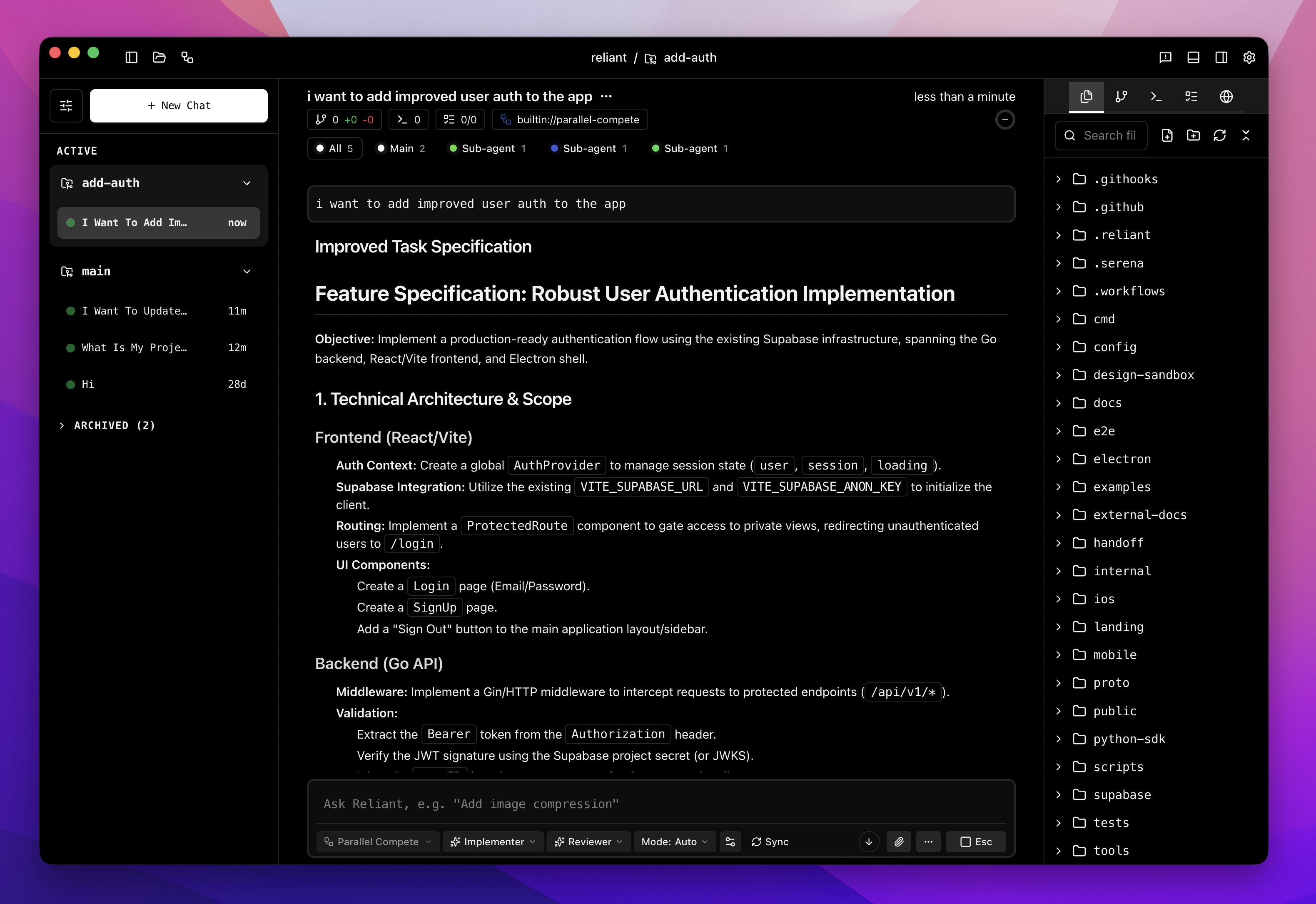 **Thread filtering:**
At the top of the chat, you'll see thread tabs showing message counts:
* **All** — Messages from all threads combined
* **Main** — Only the main conversation thread
* **\[Sub-agent name]** — Only that sub-agent's thread
Click any tab to filter the view. Useful when you want to focus on a specific sub-agent's work or see just the main conversation.
## Node Output Access
Access completed node outputs via `nodes..*`. For detailed CEL expression patterns including loop outputs, qualified IDs for nested nodes, and handling skipped nodes, see the [CEL Expressions Reference](/reference/cel-expressions).
Quick examples:
```yaml theme={null}
# Access outputs from a completed node
condition: nodes.call_llm.stop_reason == 'end_turn'
content: "Result: {{nodes.run_tests.stdout}}"
# Node inside a loop
nodes.my_loop.inner_node.output
# Check if a node was skipped
condition: has(nodes.optional_step.skipped)
```
## Related Topics
* [Branching](/features/branching) — Exploring alternative conversation paths
* [Workflow Control](/workflows/workflow-control) — Pause, resume, and interact with running workflows
* [Spawn Tool](/workflows/spawn) — How agents delegate to sub-workflows
* [Multi-Agent Patterns](/workflows/patterns) — Patterns that use multiple threads
* [CEL Expressions Reference](/reference/cel-expressions) — Complete reference for node outputs and expressions
**Thread filtering:**
At the top of the chat, you'll see thread tabs showing message counts:
* **All** — Messages from all threads combined
* **Main** — Only the main conversation thread
* **\[Sub-agent name]** — Only that sub-agent's thread
Click any tab to filter the view. Useful when you want to focus on a specific sub-agent's work or see just the main conversation.
## Node Output Access
Access completed node outputs via `nodes..*`. For detailed CEL expression patterns including loop outputs, qualified IDs for nested nodes, and handling skipped nodes, see the [CEL Expressions Reference](/reference/cel-expressions).
Quick examples:
```yaml theme={null}
# Access outputs from a completed node
condition: nodes.call_llm.stop_reason == 'end_turn'
content: "Result: {{nodes.run_tests.stdout}}"
# Node inside a loop
nodes.my_loop.inner_node.output
# Check if a node was skipped
condition: has(nodes.optional_step.skipped)
```
## Related Topics
* [Branching](/features/branching) — Exploring alternative conversation paths
* [Workflow Control](/workflows/workflow-control) — Pause, resume, and interact with running workflows
* [Spawn Tool](/workflows/spawn) — How agents delegate to sub-workflows
* [Multi-Agent Patterns](/workflows/patterns) — Patterns that use multiple threads
* [CEL Expressions Reference](/reference/cel-expressions) — Complete reference for node outputs and expressions