> ## Documentation Index
> Fetch the complete documentation index at: https://docs.reliantlabs.io/llms.txt
> Use this file to discover all available pages before exploring further.
# Create a Workflow
> Describe what you want to automate and let Reliant scope, build and test the workflow with you
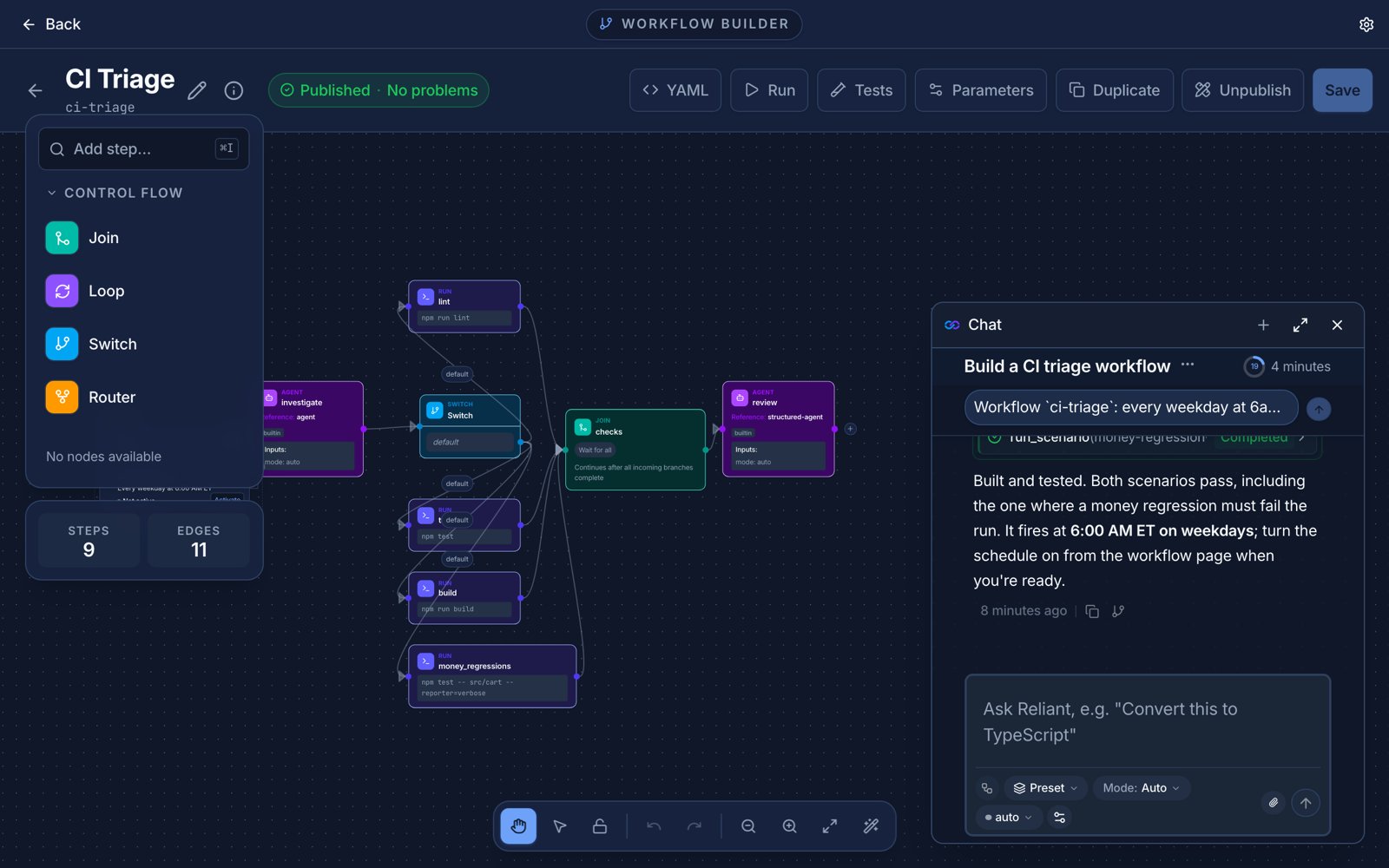
You do not have to write workflow YAML by hand. **Create a Workflow** is a built-in workflow that builds workflows. You describe what you want to automate in a conversation, and it scopes the job with you, builds anything custom the job needs, writes the workflow, and tests it with scenarios before handing it over.
 ## The three phases
**1. Scope.** A natural conversation about what you are automating: the steps, where it branches or repeats, which services and tools it touches, and whether anything needs your approval along the way. When it has enough, it writes a plan to `WORKFLOW_PLAN.md`, including an inventory of integrations.
**2. Integrations.** If the plan needs custom pieces, such as a script, a wrapper around an MCP server, or a small client for an API, they are built here, each through a [Get It Right](/guides/get-it-right) loop so it is verified before the next one. If the plan needs nothing custom, this phase is skipped. Built-in [integrations](/integrations/overview) such as GitHub and Slack are used as they are, and are not rebuilt.
**3. Workflow.** The workflow is written by an agent using the **workflow\_builder** preset, inside another Get It Right loop whose checks are scenarios: it is asked to write at least two or three scenario tests and run them. The result is saved as a workflow you can open in the builder, edit, and run.
By default it pauses for your review between phases (`ask`), so you can redirect before it spends time on the wrong plan.
## Workflow tools in any chat
You do not have to start this workflow to build or edit one. In any chat, the workflow tools are one `load_tool` away:
```text theme={null}
load_tool tag:workflow
```
That loads the tools to list, read, create, edit and validate workflows, write and run scenario tests, search the integration catalog, and activate triggers. The **workflow\_builder** preset has them from the start, along with the `workflow-builder` skill. Editing an existing workflow is the same: it finds the workflow, reads its current content, and makes targeted changes. Workflows are saved as drafts until they validate; a draft cannot be run.
## Check what it made
Validate a workflow file from the command line:
```bash theme={null}
reliant workflow validate path/to/workflow.yaml
```
Validation checks structure, CEL expressions, input and output types and cross-workflow references, and exits non-zero on any error. See [Testing workflows](/workflows/testing) for scenarios and [Custom workflows](/workflows/custom-workflows) for the format.
## Related topics
* [Improve Reliant itself](/guides/self-improvement)
* [Built-in workflows](/guides/overview)
* [Automations](/automations/overview), to run what you build on a schedule or an event
This documentation is built and hosted on [Mintlify](https://mintlify.com), a developer documentation platform.
## The three phases
**1. Scope.** A natural conversation about what you are automating: the steps, where it branches or repeats, which services and tools it touches, and whether anything needs your approval along the way. When it has enough, it writes a plan to `WORKFLOW_PLAN.md`, including an inventory of integrations.
**2. Integrations.** If the plan needs custom pieces, such as a script, a wrapper around an MCP server, or a small client for an API, they are built here, each through a [Get It Right](/guides/get-it-right) loop so it is verified before the next one. If the plan needs nothing custom, this phase is skipped. Built-in [integrations](/integrations/overview) such as GitHub and Slack are used as they are, and are not rebuilt.
**3. Workflow.** The workflow is written by an agent using the **workflow\_builder** preset, inside another Get It Right loop whose checks are scenarios: it is asked to write at least two or three scenario tests and run them. The result is saved as a workflow you can open in the builder, edit, and run.
By default it pauses for your review between phases (`ask`), so you can redirect before it spends time on the wrong plan.
## Workflow tools in any chat
You do not have to start this workflow to build or edit one. In any chat, the workflow tools are one `load_tool` away:
```text theme={null}
load_tool tag:workflow
```
That loads the tools to list, read, create, edit and validate workflows, write and run scenario tests, search the integration catalog, and activate triggers. The **workflow\_builder** preset has them from the start, along with the `workflow-builder` skill. Editing an existing workflow is the same: it finds the workflow, reads its current content, and makes targeted changes. Workflows are saved as drafts until they validate; a draft cannot be run.
## Check what it made
Validate a workflow file from the command line:
```bash theme={null}
reliant workflow validate path/to/workflow.yaml
```
Validation checks structure, CEL expressions, input and output types and cross-workflow references, and exits non-zero on any error. See [Testing workflows](/workflows/testing) for scenarios and [Custom workflows](/workflows/custom-workflows) for the format.
## Related topics
* [Improve Reliant itself](/guides/self-improvement)
* [Built-in workflows](/guides/overview)
* [Automations](/automations/overview), to run what you build on a schedule or an event
This documentation is built and hosted on [Mintlify](https://mintlify.com), a developer documentation platform.